Wednesday, January 20, 2010
Status update
Guys, we are still doing some final tweaks before releasing the Stereoscopic version for sale. We will also release Red-Cyan version for free for personal use very soon. Stay tuned...

Wednesday, January 6, 2010
Plan to start taking order in some weeks time!
Due to the recent intensive inquiries of purchasing end user version of 3Dfier for Stereoscopic Player, we are working on a side-by-side version that will be sold at the price of $25. This version is intended to work with Sterescopic Player only. We would start to take order in these weeks. Please bear with us a bit. Thanks very much for your interests in 3Dfier product and appreciate your patience with us. We hope to deliver to you the best converted 3D experience at most affordable price to help you extend the capabilities of the 3D display devices you have invested in.
Sherlock Holmes - Official Trailer [HD] made to 3D with new 3Dfier engine
Click on the URL to utilize the Youtube 3D features to view in 3D directly.
http://www.youtube.com/watch?v=zOknKMhc9H8
http://www.youtube.com/watch?v=zOknKMhc9H8
Avatar movie trailer converted Youtube HD/3D with new 3Dfier engine
Click on the URL to utilize the Youtube 3D features to view in 3D directly.
http://www.youtube.com/watch?v=SfuBuERvPII
http://www.youtube.com/watch?v=SfuBuERvPII
Jennifer's Body Trailer converted Youtube HD/3D with new 3Dfier engine
Click on the URL to utilize the Youtube 3D features to view in 3D directly.
http://www.youtube.com/watch?v=iw-lvlCo3xE
http://www.youtube.com/watch?v=iw-lvlCo3xE
Thursday, August 6, 2009
How to setup Media Player Classic for 3Dfier
Please note that there are many versions of MPC on the net and currently we do not guarantee the retail 3Dfier works with MPC but we do know it works with some versions like the one comes with Real Alternative (version 6.4.9.1). If you have no luck with your copy of MPC, try this version and let us know what version you have problems with.
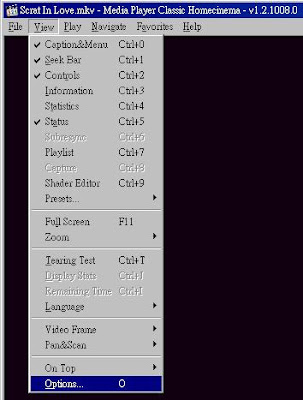
After Media Player Classic installed(most likely come with K-lite codec pack or Real Alternative), launch Media Player Classic and go to Options.
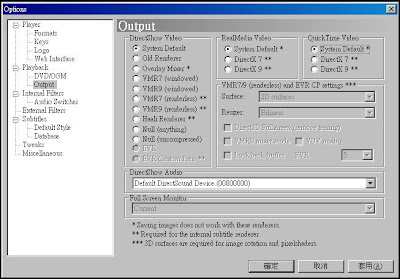
 Select "Output" and find the DirectShow Video where the available renderers are listed. Select "System Default" or VRM9 for 3Dfier to work with Media Player Classics. Select "System Default" only for Windows 7.
 If you want to use Media Player Classic to play DVD with 3Dfier, uncheck the "MPEG-2 Video" Transformer Filters from "Internal Filters" Option.
 If 3Dfier is configured and running correctly, you will see 3Dfier icon shown in system tray and also the Player->Filters menu item will show 3Dfier 2D to 3D transform filter in the list.
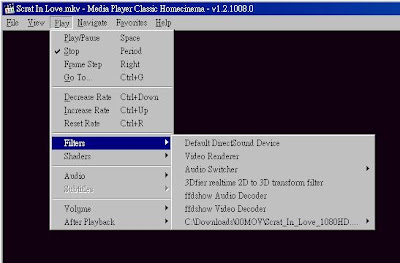
3Dfier icon will be shown on system tray only when you open or play a file with Media Player Classic or other players that is compatible with DirectShow. You might need to try to find it by yourself under Windows 7 where not all icons are shown by default.
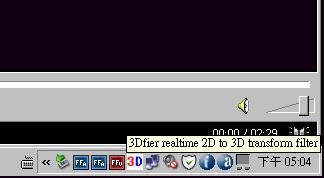 Right-Click on the icon, you will have access to the control of 3Dfier including enable/disable, Input Type selection (Normal, Above-Below or Side-by-Side) and Swap Left/Right. Remember to stop Media Player Classic playback before make any change.

After Media Player Classic installed(most likely come with K-lite codec pack or Real Alternative), launch Media Player Classic and go to Options.
 Select "Output" and find the DirectShow Video where the available renderers are listed. Select "System Default" or VRM9 for 3Dfier to work with Media Player Classics. Select "System Default" only for Windows 7.
 If you want to use Media Player Classic to play DVD with 3Dfier, uncheck the "MPEG-2 Video" Transformer Filters from "Internal Filters" Option.
 If 3Dfier is configured and running correctly, you will see 3Dfier icon shown in system tray and also the Player->Filters menu item will show 3Dfier 2D to 3D transform filter in the list.
3Dfier icon will be shown on system tray only when you open or play a file with Media Player Classic or other players that is compatible with DirectShow. You might need to try to find it by yourself under Windows 7 where not all icons are shown by default.
 Right-Click on the icon, you will have access to the control of 3Dfier including enable/disable, Input Type selection (Normal, Above-Below or Side-by-Side) and Swap Left/Right. Remember to stop Media Player Classic playback before make any change.
Saturday, June 6, 2009
Optimized anaglyph playback with 3Dfier!
You can now get great anaglyph viewing experience with 3Dfier by using the Optimized Anaglyph rendering option with iZ3D Media Player Classics:
Install both iZ3D Media Player Classics and 3Dfier Side-By-Side filter. Go to iZ3D Media Player Classics Options and set the Stereo Rendering as "Optimized Anaglyph".

Remember to set the Stereo format as "Side By Side" when playback video files. Try it. The anaglyph result is really better with the combination of 3Dfier and iZ3D Media Player Classics!

Install both iZ3D Media Player Classics and 3Dfier Side-By-Side filter. Go to iZ3D Media Player Classics Options and set the Stereo Rendering as "Optimized Anaglyph".

Remember to set the Stereo format as "Side By Side" when playback video files. Try it. The anaglyph result is really better with the combination of 3Dfier and iZ3D Media Player Classics!

Subscribe to:
Posts (Atom)