Saturday, June 26, 2010
DVBViewer works with 3Dfier
Thanks to teklordsb's feedback, we have tested the DVBViewer and found it works with 3Dfier with its postprocessing plugin. The setup is a bit complicated but it works. Wait for next 3Dfier release, we will have DVBViewer supported plus more MPC support. This works for Anaglyph and interleaved passive polarizer display only. To watch TV with shutter glasses, go with Stereoscopic Player.

Saturday, June 12, 2010
Watch World Cup with Stereoscopic Player in 3D
You probably know Stereoscopic Player full version has the capability to allow you watch TV in 3D with a TV Tuner card. If you are lucky to be receiving broadcast in 3D, you can watch 3D World Cup with Stereoscopic Player. Don't feel bad if you don't because you can use 3Dfier together with Stereoscopic Player to watch 3D World Cup as well. Surely nothing beats real 3D but we are offering great 2D to 3D viewing experience with 3Dfier when you do not have the 3D source...
Tsubaki, Japan Shampoo ad converted to 3D with 3Dfier algorithm
Search 3Dfier in Youtube to see more...
Monday, June 7, 2010
How to regsiter with your product key

 Open the 3Dfier Control Panel. Find it on the system tray and right click the icon, select "About"

In the "About" dialog, click on register.

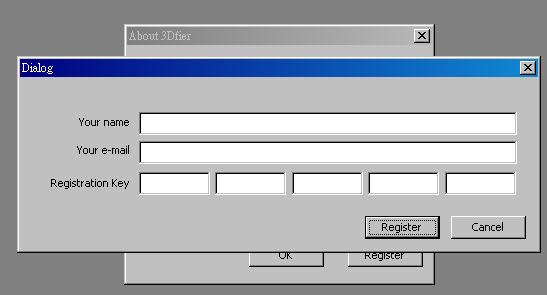
In the dialog below, enter your name, your e-mail and registration key exactly as what we have sent to you in the e-mail et voila! You should see a success message after you click on Register button.
Friday, June 4, 2010
Stereoscopic Player works with DVD and so does 3Dfier!
There is a confusion whether 3Dfier works with DVD and the answer is obviously dependent on the media players that works with 3Dfier. And surely the Stereoscopic Player/3DVision Video Player can work with DVD and hence 3Dfier! Check out this page from 3dtv.at. It tells how DVD works with Stereoscopic Player.
If you use Media Player Classic, see here for the setting to make DVD works.
Thursday, May 20, 2010
3Dfier works with e-Dimensional shutter glasses!
Guys, while e-Dimensional shutter glasses does not offer the best resolution and quality, it is fairly good in a dark room (imagine the theater experience). It runs with regular monitor. You don't need 120Hz monitor to use it. You see flickering at 60Hz and much less flickering with 75Hz. You don't really see flickering in the dark and best of all, it works with 3Dfier! Just select the output format as interleave from Highly recommended Stereoscopic Player (or from 3Dfier control panel if you use Media Player Classics) and that's it! Enjoy e-Dimensional with 3Dfier!
Edit
Thanks to jcon's feedback on e-Dimensional with 120Hz projector below:
jcon said...
Hi guys,
I use eDimensional shutter glasses together with a 120Hz compatible Acer projector and there is a better way of using them with the 3Dfier plugin: You can use EDActivator.exe from the eDimensional homepage and select "page-flipping" from the menu. In Stereoscopic Player you also select "software page flipping" as the viewing method. In 3dfier you select side by side output instead of interleave. This combination gives a much brighter picture!
Monday, May 17, 2010
A 3rd party 2D to 3D review reveals a sad thing
You probably will feel angry as I am if you likes our product. From this independent review, you can see very clearly our older algorithm got reversed and you who have downloaded know that anyone who installed our filter agreed not to do so. Well, but this is not the end of the world. Put your red-cyan glasses on and you can see our new release has improved and beats theirs. Since we are the inventor of this best solution and much cheaper, why bother buying their solution! If you like our products and respect the efforts we put in making 2D to 3D come true, please tell your friends and family say NO to them!
Subscribe to:
Posts (Atom)