Thursday, June 23, 2011
New Software Release This Summer

Thursday, May 19, 2011
New Download Website
Monday, January 24, 2011
Closing from 1/29~2/7 for Chinese New Year holidays
We will be closing for Chinese New Year holidays from 1/29 to 2/7. We will not be able to deliver for any order placed during this period. Please be patient with us and we will provide our best support after the holiday. Happy Chinese New Year!
3Dfier staff
Wednesday, August 11, 2010
3Dfier supports 3DTV!
Most 3DTVs on the market today have the capability to turn side-by-side video to frame sequential format automatically with a 3D button on the remote control to work with the shutter glasses that come with the 3DTV. This is mainly for the 3D broadcasting that are running in side-by-side format. What you need to do is to use either Stereoscopic Player or Media Player Classic and make sure you set the output format to side-by-side (which is default of 3Dfier) and play the video to full screen. Then turn on the side-by-side to 3D by the remote control et Voila!
Some 3DTVs like Samsung's disabled the side-by-side to 3D conversion when the input is HDMI 1.4 3D compliant mode (1280x720@60Hz or1920x1080@24Hz) . Make sure you do not set to these modes in order to make it work. In fact, if you are running a current shipping PC, it might come with only HDMI 1.3 and you won't have the HDMI 1.4 3D support. This is bad for BD3D playback but it will work well with side-by-side to 3D conversion or 2D to 3D conversion with 3Dfier! Enjoy the experience of 3Dfier on the large TV screen today!
Tuesday, July 13, 2010
User's Guide for Stereoscopic Player
Requirement:
Stereoscopic Player 1.5.4 or above.
How to use 3Dfier with 3D Vision Video Player or Stereoscopic Player
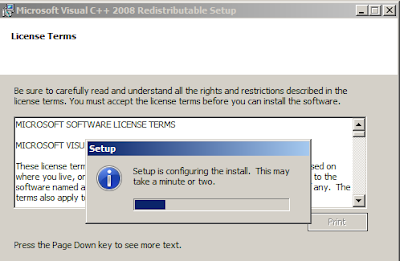
1. Uninstall the prior version of 3Dfier. Be sure to install the Visual C++ 2008 redistributable (vcredist_x86.exe) for the first time installation of new 3Dfier.
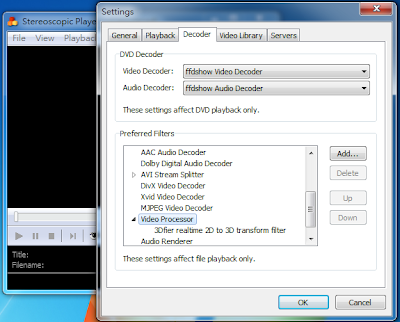
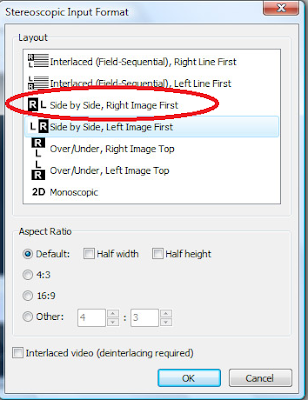
When opening a video file from Stereoscopic Player, select Side-by-Side input format.
After successfully installed 3Dfier, you can find 3Dfier Control Panel on the Desktop and in the Windows Start Menu.

Launch 3Dfier Control Panel and you will find a 3D icon in the system tray.
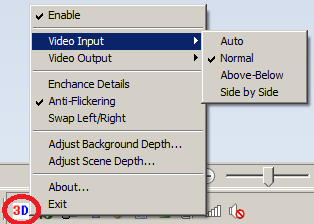 Right Click on the 3Dfier icon to get access to the controls: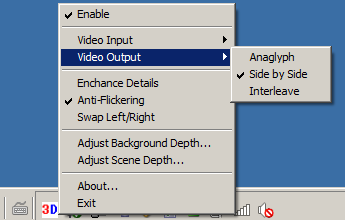
1. [Enable]: click on this to enable or Disable 3Dfier 2D to 3D conversion. Any selection will take effect only when you launch Strereoscopic Player or open a file next time when filter driver can be loaded.
2. [Video Input]: In order to make 2D to 3D conversion work for Stereoscopic Player, please select "Normal" (default).
3. [Video Output]: Select "Side by Side" (default) for Stereoscopic Player.
4. [Enhance Details]: This is a new feature that could take more CPU usage in order to render detail 3D effects.
5. [Anti-Flickering]: For reducing the flickering effects during scene change. (default enabled)
6. [Swap Left/Right]: This is for swapping left and right eyes depending on the left and right settings you might set for Stereoscopic Player.
7. [Adjust Background Depth]: This is used to adjust the depth of the background.
8. [Adjust Scene Depth]: This is used to move the overall scene forward or backward.
With these settings properly set, you can start to enjoy our most natural 2D to 3D conversion experience we are to offer. Thanks for using 3Dfier.
Sunday, July 4, 2010
3Dfier Directdhow filter v1.0.21 demo is ready for download
-Fix compatibility issues with some versions of Media Player Classic
-Add the support for DVBViewer through its postprocessing plugin. Now you can watch DVB broadcast in 3D! Anaglyph, fullscreen interleave mode for Passive Polarizer Displays and eDimensional shutter glasses are supported. The setup of the plugin is a bit complicated. Hopefully DVBViewer folks will come out an easier setup soon.
Here you can download the latest demo.